What Is an SPL Token? Solana Tokens Explained
An SPL token is a digital asset created and managed on Solana through its token-program infrastructure. This beginner’s guide explains how SPL tokens work, how they differ from SOL and NFTs, and what to know before creating one.

Solsmint
Author
An SPL token is a digital asset created and managed on the Solana blockchain through Solana’s token-program infrastructure. SPL stands for Solana Program Library.
Unlike SOL, which is Solana’s native asset used to pay network fees, SPL tokens are separate assets that projects, communities, apps, and individuals can create. Examples include community tokens, governance tokens, stablecoins, reward points, and in-game currencies.
This guide explains what an SPL token is, how it works, how it differs from SOL and NFTs, and what beginners should understand before creating one.
What Does SPL Token Mean?
SPL stands for Solana Program Library. It is a collection of on-chain programs and tools maintained for the Solana ecosystem, including the token programs used to create and manage digital assets.
An SPL token is not a separate blockchain and not something users need to buy before using Solana. It is a token that lives on Solana and is managed by a token program.
Solana’s documentation describes tokens on the network as SPL tokens and explains that token programs contain the instruction logic for interacting with both fungible and non-fungible tokens. Solana token documentation
A useful way to think about it:
-
Solana is the blockchain.
-
SOL is Solana’s native asset.
-
An SPL token is a token created on Solana through its token-program infrastructure.
For example, a project can create a token called “Community Coin” on Solana. That token may have its own name, symbol, supply, image, and mint address—but it still exists on the Solana network.
How Do SPL Tokens Work on Solana?
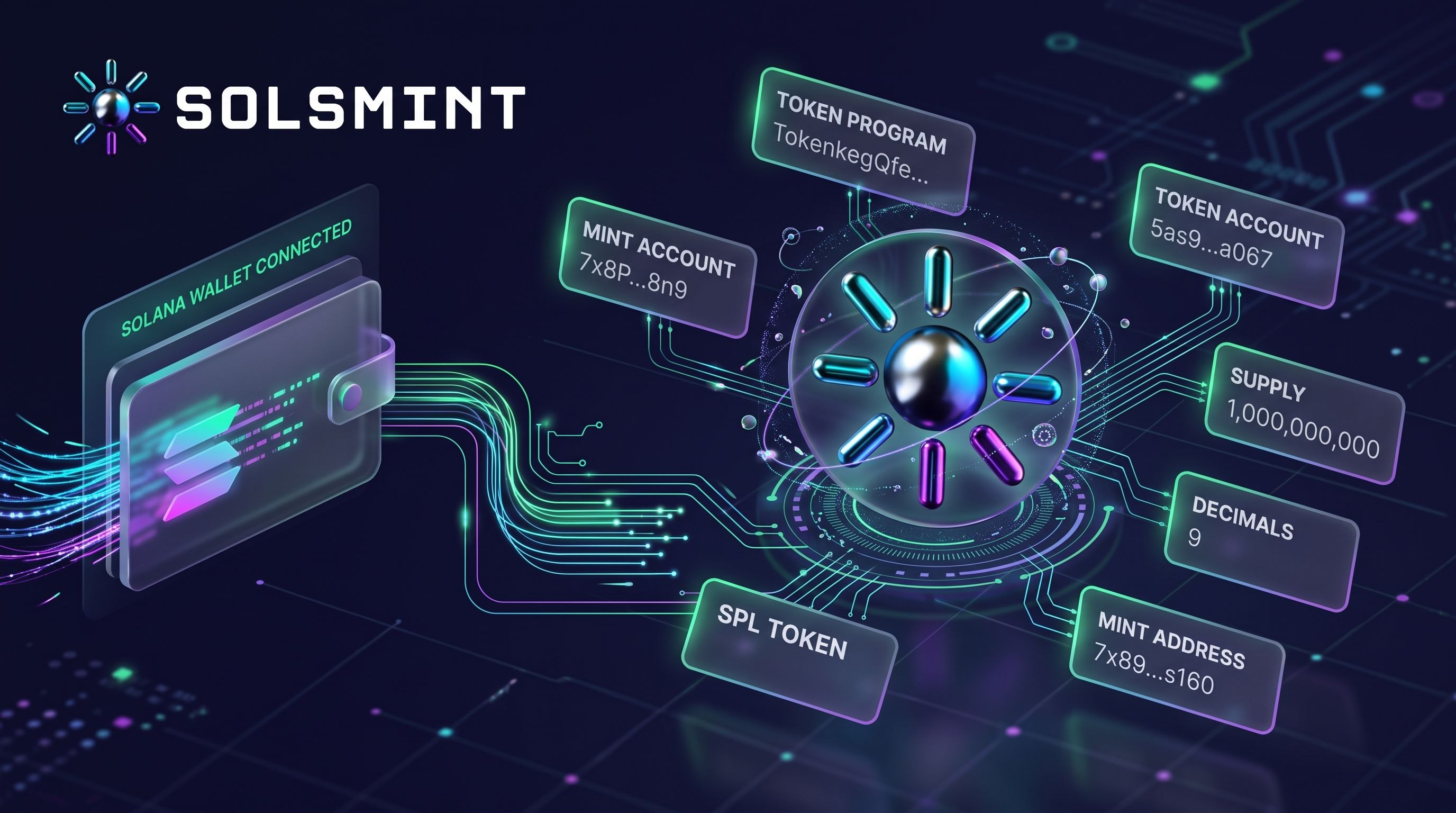
SPL tokens rely on a few core on-chain components: a token program, a mint account, token accounts, and wallet ownership.
Token Program
A token program contains the logic for creating, transferring, minting, burning, and managing tokens. Solana has two main token programs:
-
The original Token Program
-
The Token Extension Program, commonly called Token-2022
Solana’s documentation states that the original Token Program provides basic token capabilities such as minting and transferring, while Token-2022 includes those features and adds functionality through extensions. Solana token documentation
Mint Account
Every SPL token has a mint account. This account defines the token and stores shared information that applies to all units of that token.
A mint account stores data such as:
-
Total supply
-
Decimals
-
Mint authority
-
Freeze authority, if one is configured
Solana’s documentation explains that the mint account represents a specific token and acts as a global counter for its supply. Solana token documentation
Token Accounts
A token account tracks ownership of a particular token. It records which mint the tokens belong to, who owns the account, and how many tokens it currently holds.
A wallet needs a token account for each token it wants to hold. For example, if one wallet holds two different SPL tokens, it will generally have separate token accounts for each mint.
Solana also uses associated token accounts, or ATAs. These are token accounts with addresses derived from the owner’s address and the token’s mint address. They act as a predictable default token account for a specific wallet and token. Solana token documentation
It helps to separate these ideas:
-
A wallet address identifies the user’s main Solana account.
-
A mint address identifies a specific token.
-
A token account holds a balance of a specific token for a specific owner.
A wallet interface may display tokens as if they are simply “inside” the wallet, but on-chain they are associated with token accounts owned by that wallet.
Transactions and Network Fees
Sending, minting, burning, or otherwise interacting with an SPL token requires a Solana transaction. Transactions are processed by the network and may require SOL to pay applicable network fees.
The exact cost depends on the transaction, account creation requirements, network conditions, and whether priority fees are used. Creating or holding certain token accounts may also require a refundable minimum balance for account storage.
What Is the Difference Between SOL and an SPL Token?
SOL and SPL tokens are both digital assets on Solana, but they serve different roles.
| Asset | SOL | SPL Token |
|---|---|---|
| What it is | Solana’s native asset | A token created through Solana’s token-program infrastructure |
| Role on Solana | Used for network fees and core network activity | Can represent a community token, utility asset, stablecoin, reward point, or other digital asset |
| Typical uses | Paying transaction fees, staking-related activity, and interacting with the network | Payments, governance, rewards, DeFi, gaming assets, community tokens, and more |
| Network fees | SOL is used to pay applicable transaction fees | SPL token transactions generally still require SOL for network fees |
| Can a project create its own version? | No. SOL is Solana’s native asset. | Yes. Projects can create their own SPL tokens. |
SOL is not an ordinary SPL token. It is the native asset of the Solana network. SPL tokens are separate assets created and managed through Solana’s token programs. Solana token documentation
What Are SPL Tokens Used For?
SPL tokens can represent many kinds of digital assets. What a token actually does depends entirely on the project and how it is implemented.
Common uses include:
-
Meme coins and community tokens: tokens created around a community, brand, or shared interest.
-
Utility and governance tokens: tokens used for access, voting, or participation in a project.
-
Rewards and incentives: loyalty points, referral rewards, or community incentives.
-
Payments and digital assets: tokens used within an app, marketplace, or service.
-
DeFi applications: tokens used in lending, trading, staking-related systems, or liquidity markets.
-
Stablecoins: tokens designed to track the value of another asset, such as a fiat currency.
-
In-game or loyalty assets: fungible game currencies or membership points.
Creating an SPL token does not automatically give it utility, users, demand, liquidity, or value. The token’s purpose must be supported by the project, product, community, or system built around it.
SPL Tokens vs. NFTs
SPL tokens and NFTs are both digital assets on Solana, but they work differently.
A fungible token is interchangeable. One unit is generally equivalent to another unit of the same token. If you hold 100 units of a community token, each unit is the same as the next.
An NFT, or non-fungible token, represents a distinct asset. One NFT is not interchangeable with another in the same way. For example, one digital collectible may have a different image, serial number, or set of attributes from another.
The distinction is not only about the name. NFT implementations can differ from ordinary fungible SPL tokens, and metadata, ownership records, and standards may vary depending on the implementation. Solana’s documentation notes that token programs support interaction with both fungible and non-fungible tokens. Solana token documentation
In simple terms:
-
SPL fungible token: 1 token equals another token of the same type.
-
NFT: each asset is distinct and generally not interchangeable with another.
Important SPL Token Properties Beginners Should Understand
Before creating or evaluating an SPL token, it helps to understand the properties that define it.
| Property | What It Means | Why It Matters |
|---|---|---|
| Token name | The human-readable name, such as “Community Coin” | Helps users recognize the token |
| Symbol | The short ticker, such as “CC” | Used in wallets, explorers, and trading interfaces |
| Mint address | The unique on-chain identifier for the token | Used to verify the exact token across wallets, apps, and explorers |
| Decimals | The number of decimal places used to display fractional units | Affects how token amounts are represented, not the token’s value |
| Supply | The total number of token units currently in existence | Important for understanding token distribution |
| Mint authority | The address authorized to create additional units, if configured | Determines whether more tokens can be minted |
| Freeze authority | The address authorized to freeze and thaw token accounts, if configured | Relevant to whether token accounts can be restricted |
| Metadata and image | The token’s public name, symbol, description, and image, where supported | Helps wallets and explorers display the token correctly |
A token’s name and symbol are useful for recognition, but they do not uniquely identify it. Two tokens can share the same name or ticker. The mint address is the reliable identifier.
Token Supply and Decimals
Supply is the total number of token units that currently exist. If a project creates 1,000,000 tokens and does not mint more, the supply is 1,000,000.
Decimals determine how fractional units are displayed. A token with 9 decimals can represent amounts down to 0.000000001 of a token.
For example, if a token has 9 decimals, a balance displayed as 1 token may be represented on-chain as 1,000,000,000 base units. Decimals affect representation and divisibility; they do not determine a token’s price, value, or success.
Mint Authority
The mint authority is the address authorized to create additional units of a token, if one is configured.
If a mint authority remains active, that address may be able to mint more tokens and increase supply. If no mint authority is present, the mint has a fixed supply and no further tokens can be minted. Solana create-a-mint documentation
This is an important distinction. A fixed supply does not guarantee value, but it does mean no additional units can be minted under the applicable token program.
Freeze Authority
The freeze authority, when configured, is the address authorized to freeze and thaw token accounts.
Freezing a token account can prevent transfers, burns, and delegate changes for that account. Thawing restores normal functionality. Solana’s documentation describes freeze and thaw actions as authority-controlled operations. Solana SPL Token Basics
Not every token has a freeze authority. Whether a token can be frozen depends on how it was created and whether a freeze authority was configured.
Metadata and Token Image
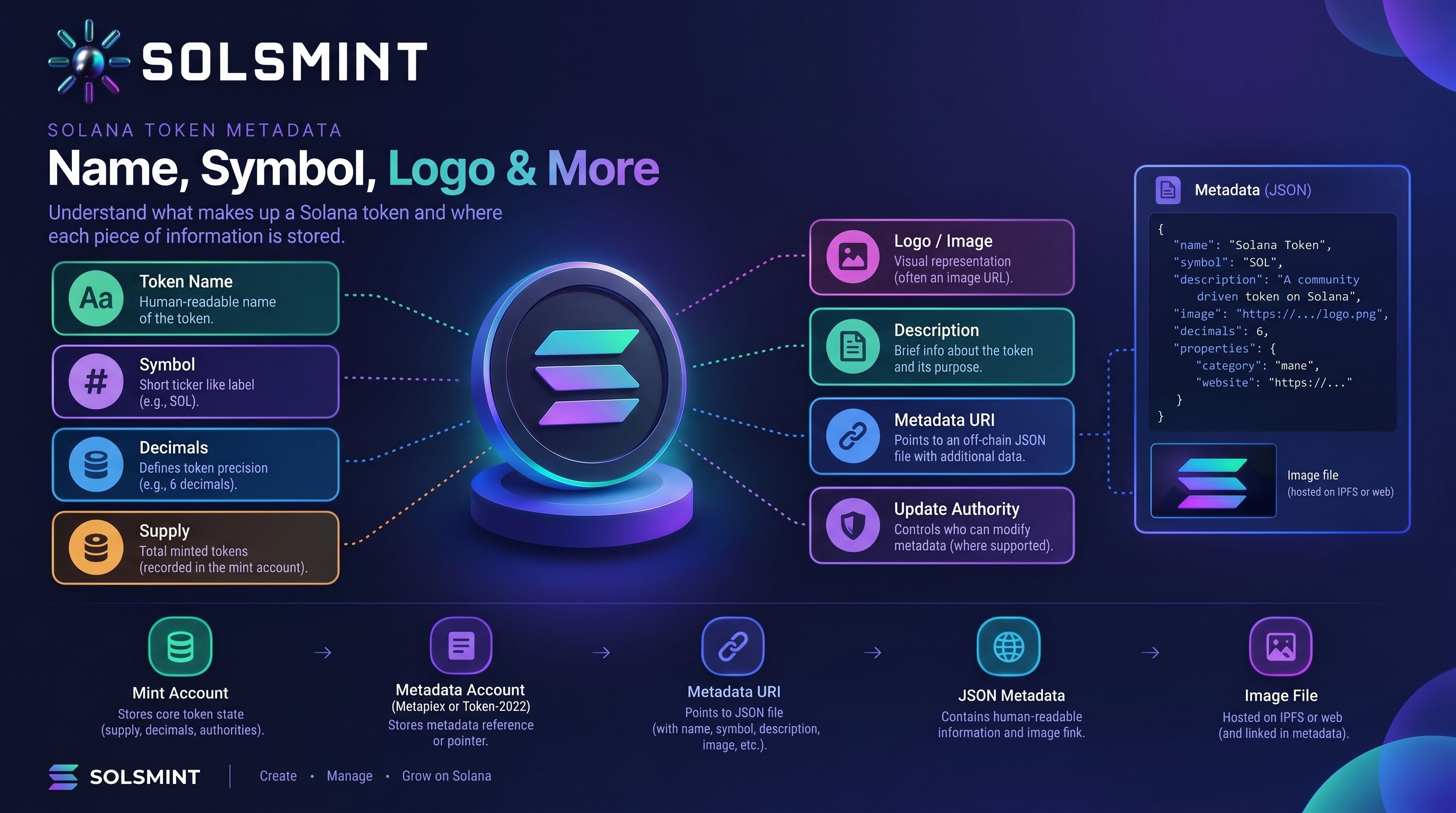
A mint account stores core token-program data such as supply, decimals, and authority settings. Human-readable details—such as the token name, symbol, description, and image—are handled separately as metadata.
Solana’s documentation explains that metadata can be added using Metaplex Token Metadata or, for tokens created with Token-2022, through the Token-2022 metadata extension. Solana create-a-mint documentation
Metadata helps wallets and explorers display a token correctly, but it should still be verified through the mint address.
What Is the Difference Between the Token Program and Token-2022?
The original Solana Token Program provides the foundational functionality for creating and managing SPL tokens. It is widely used and includes core actions such as creating a mint, minting tokens, transferring tokens, burning tokens, and setting authorities.
Token-2022, also called the Token Extension Program, includes the original Token Program’s core functionality and adds features through extensions.
Extensions can support different token behaviors or metadata approaches. However, not every extension is supported by every wallet, application, or service. Compatibility depends on the specific extension, the token implementation, and the tools interacting with it.
For a beginner, the practical takeaway is simple: the original Token Program is the established baseline, while Token-2022 offers an extension-based approach for projects that need additional functionality. Always confirm that the wallets, exchanges, and applications you plan to use support the token type and features you choose.
Can Anyone Create an SPL Token?
In general, yes. Creating an SPL token is a technical process that can be done through code or through a no-code interface. But creating a token is only the first step.
A creator typically needs:
-
A compatible Solana wallet
-
SOL for applicable transaction fees and account-related costs
-
Token details, including name, symbol, supply, and decimals
-
Authority settings, such as mint authority and freeze authority
-
Metadata and an image, where supported
-
A clear reason for creating the token
Creating a token on-chain is different from building a complete project. It does not automatically create a product, establish utility, attract users, generate trading volume, or create a liquid market.
If you want to create your own Solana token without writing code, you can explore Solsmint’s Solana token creator.
How to Create an SPL Token Without Coding
The exact workflow depends on the platform, but a typical no-code process looks like this:
-
Choose a token creation interface.
-
Connect a compatible Solana wallet.
-
Enter the token name and symbol.
-
Configure the supply and decimals.
-
Set the available authority options.
-
Add metadata or an image where supported.
-
Review all token details and applicable costs.
-
Approve the transaction in the wallet.
-
Save the resulting mint address.
-
Verify the token details using a Solana explorer.
This is a general workflow, not a guarantee that every platform supports every configuration. Before creating a token, review the supported token program, metadata options, authority settings, and network costs in the interface you are using.
Solsmint provides a no-code interface for supported Solana token creation workflows. You can explore Solsmint’s token creator to see the current options.
Common Mistakes to Avoid When Creating an SPL Token
Confusing the Wallet Address With the Mint Address
Your wallet address identifies your Solana account. The mint address identifies the token itself. They are not the same thing.
Always share and verify the token’s mint address when directing users to a specific token.
Choosing the Wrong Supply or Decimals
Supply and decimals are important configuration choices. Changing them later may not be possible or practical, depending on the token setup.
Think through the intended use case before creating the mint.
Misunderstanding Mint Authority
If mint authority remains active, additional tokens may be mintable. If the goal is a fixed supply, understand how to remove or revoke mint authority according to the token program and interface being used.
Assuming Every Token Can Be Frozen
Freeze authority is optional. A token cannot necessarily be frozen just because it is an SPL token. Check whether a freeze authority was configured.
Ignoring Metadata Compatibility
A token image and description may not display correctly in every wallet or application. Metadata compatibility depends on the token program, metadata standard, and platform.
Forgetting Applicable Network Costs
Token creation and token-account operations can involve Solana network fees and account-related costs. Review the transaction details before approving them.
Assuming Token Creation Creates Liquidity or Demand
Creating a token does not create a market. Liquidity, buyers, trading volume, exchange listings, and community interest require separate work.
Assuming a Token Is Safe Because It Exists On-Chain
An on-chain token is not automatically legitimate or safe. Verify the mint address, review available project information, and use caution before interacting with unfamiliar tokens.
For token risk research, Solsmint provides a rug check tool.
Frequently Asked Questions
What does SPL stand for in Solana?
SPL stands for Solana Program Library. In everyday usage, an SPL token refers to a token created and managed on Solana through its token-program infrastructure.
Is SOL an SPL token?
No. SOL is Solana’s native asset and is used for network fees and core network activity. SPL tokens are separate assets created through Solana’s token programs.
Are SPL tokens and Solana tokens the same thing?
The terms are often used interchangeably. “Solana token” usually means a token on Solana, while “SPL token” more specifically refers to a token managed through Solana’s token-program infrastructure.
How do I find an SPL token’s mint address?
You can find it through a Solana explorer, a wallet’s token details view, or the project’s official documentation. The mint address is the token’s unique identifier, so always verify it before interacting with a token.
Can anyone create an SPL token?
Yes, in general. A creator needs a compatible Solana wallet, SOL for applicable fees, and the token configuration details. Creating a token does not guarantee users, utility, liquidity, or value.
Do SPL tokens have a maximum supply?
Not necessarily. A token’s supply depends on how it was created. If no mint authority is configured, no additional tokens can be minted under the applicable token program. If mint authority remains active, more tokens may be mintable.
What is the difference between an SPL token and an NFT?
An SPL fungible token has interchangeable units, while an NFT represents a distinct asset. NFT implementations can differ from ordinary fungible SPL tokens.
How much does it cost to create an SPL token?
The cost depends on Solana network fees, account-related costs, and any platform fees charged by the creation interface. Review the transaction before signing; costs can vary based on the token configuration and network conditions.
Conclusion
An SPL token is a digital asset created and managed on Solana through its token-program infrastructure. SPL stands for Solana Program Library, and SPL tokens can represent community tokens, utility assets, stablecoins, rewards, and many other digital assets.
SOL remains Solana’s native asset, while SPL tokens are separate assets that projects can create. A token’s mint address identifies it on-chain, while its supply, decimals, mint authority, freeze authority, and metadata define how it works and how it appears in wallets and explorers.
Creating an SPL token is accessible, but it is only the beginning. A token still needs a clear purpose, responsible management, and real demand to become useful.
To explore a no-code way to create a Solana token, visit Solsmint’s Solana token creator.
About Solsmint
Crypto enthusiast and blockchain analyst with expertise in the Solana ecosystem. Passionate about educating others on the potential of decentralized technologies and DeFi innovations.