Solana Token Metadata Explained: Name, Symbol, Logo, and More
Learn where Solana token names, symbols, logos, descriptions, decimals, and supply are represented. Compare Metaplex and Token-2022 metadata, and find out what to verify before launch.

Solsmint
Author
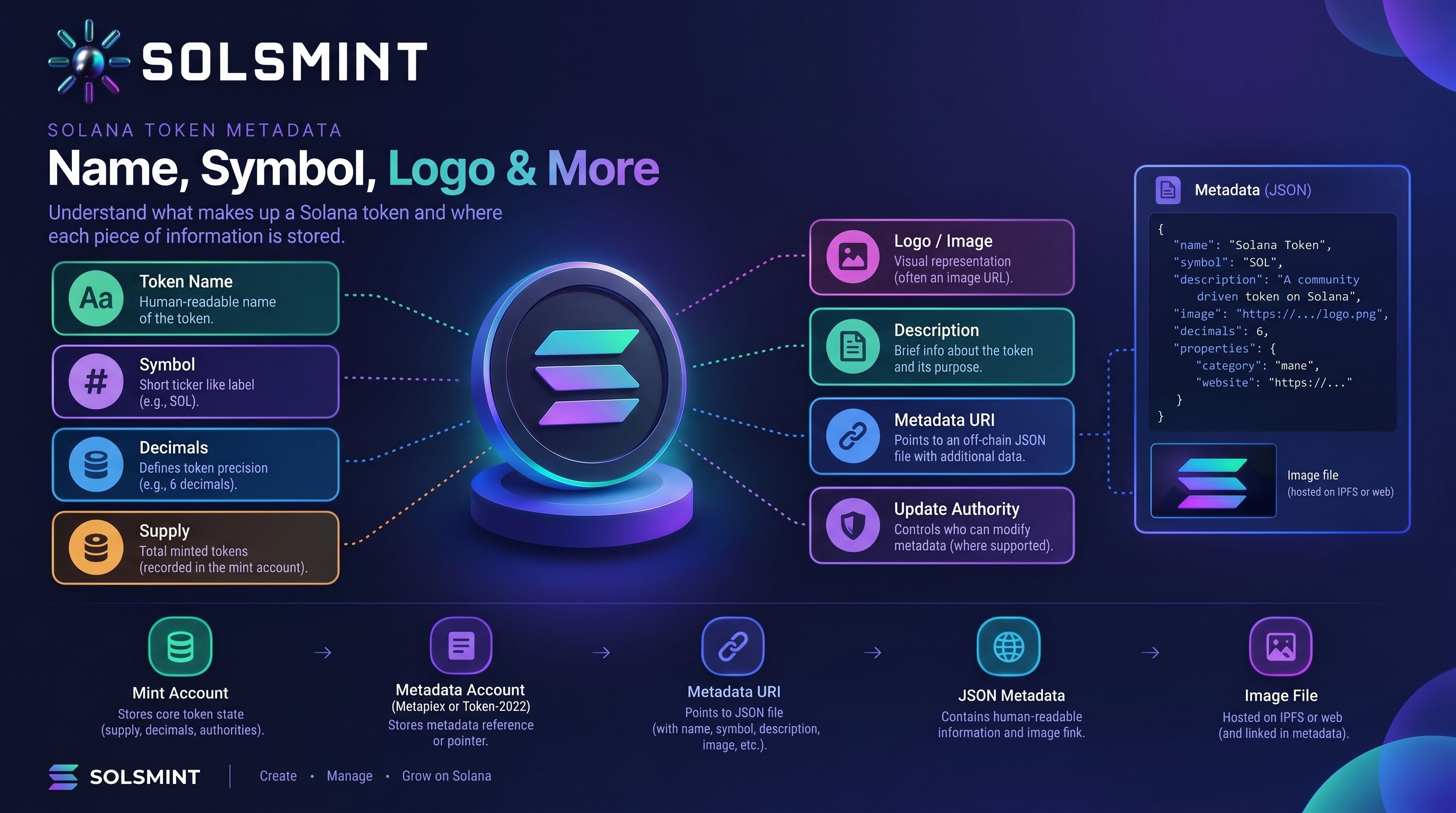
A Solana token’s identity involves more than its name and logo. The mint account holds core token state such as decimals, current minted supply, and certain authorities. Descriptive details—such as a name, symbol, image, and description—are provided through a metadata system, and the exact setup depends on the token program and metadata standard.
Understanding that distinction helps you choose compatible metadata, prepare accurate token information, and avoid common launch problems. This guide explains how Solana token metadata works, where it is stored, what can change after launch, and what to check before creating a token.
Note: Wallets, explorers, and other applications may display metadata differently. Their indexing, caching, and supported standards can affect what users see.
What Is Solana Token Metadata?
Solana token metadata is descriptive information associated with a token, such as its name, symbol, and links to an image or description. It helps wallets, explorers, and applications identify and display an asset. The metadata format and storage method depend on the token program and metadata standard.
Metadata does not replace the token’s mint address. The mint address is the token’s unique on-chain identifier. Names and symbols can be duplicated or imitated, so users should verify the mint address through a trusted project source.
What Information Does a Solana Token Contain?
Some token properties describe how the token works; others help applications display it.
On a standard Solana mint account, core state includes supply, decimals, Mint Authority, and Freeze Authority. It does not inherently contain every descriptive field that wallets show. Solana’s mint-account documentation
Where Is Solana Token Metadata Stored?
There is no single metadata-storage format shared by every Solana token.
For a standard SPL Token using Metaplex Token Metadata, the Metaplex program creates a metadata account associated with the mint. That account stores on-chain fields such as the name and symbol, along with a URI that can point to off-chain JSON. Solana’s Metaplex metadata documentation
Token-2022 offers a different option: its Token Metadata extension can store fields such as name, symbol, URI, update authority, and custom metadata directly on the mint. Its Metadata Pointer extension is separate: it identifies an account that stores metadata. Solana’s Token-2022 metadata-extension documentation
A simplified example of a common Metaplex setup is:
Token mint
  → Metaplex metadata account
    → metadata URI
      → JSON document
        → image or other linked resources
This is an illustration, not a universal layout. With Token-2022’s Token Metadata extension, some metadata can be stored directly on the mint instead.
What is a metadata account?
In the Metaplex setup, the metadata account is a separate on-chain account linked to the token mint. It is a Program Derived Address (PDA): an address calculated from known inputs, including the mint address and the metadata program. The PDA gives applications a predictable way to find the metadata for a mint. Solana’s Metaplex metadata documentation
Name, Symbol, Decimals, and Supply Are Different
The token name and symbol identify the asset in interfaces. Decimals and supply describe core token state.
Decimals specify how many fractional places the token supports. If a mint has six decimals, a balance can represent fractional amounts down to one-millionth of a token. Decimals are configured as part of mint creation; they are not just a cosmetic metadata field. Solana’s mint-account documentation
Supply is the number of token units minted so far. It is different from:
-
Circulating supply: an estimate of tokens available in the market, based on a provider’s methodology.
-
Maximum supply: a cap a project may define or enforce through its design.
-
Minted supply: the current supply recorded by the token mint.
The mint account records current supply and decimals. A metadata update does not change either value.
How Do Logos, Descriptions, and Metadata URIs Work?
A metadata URI often points to a JSON document. The JSON can contain fields such as a description and an image URL. The image itself is a separate file; the metadata record links to it.
For example, a metadata document might contain a token name, symbol, description, and image URL. A wallet or explorer reads the URI, retrieves the JSON, and then attempts to load the image.
A valid URI does not guarantee that every application will display the logo. The application may not support that metadata standard, may cache older data, or may be unable to retrieve the JSON or image.
Before launch, check:
-
The JSON is valid and publicly accessible.
-
The image URL loads without requiring a login.
-
The image format and dimensions work for your intended platforms.
-
The metadata URI points to the correct document.
-
The document’s fields match the token’s intended name and symbol.
-
The hosting method fits your availability and persistence needs.
IPFS or Arweave may be used for hosting, but availability depends on how the content is stored and maintained. Do not assume that a URI is permanent simply because it uses a particular storage network.
Metaplex Metadata vs. Token-2022 Metadata
These approaches are not interchangeable in every application. Choose based on your token requirements and the wallets, explorers, exchanges, and other software your users are likely to use. Solana’s documentation distinguishes the Metadata Pointer—which points to a metadata account—from the Token Metadata extension, which stores metadata on the mint. Solana’s Token-2022 metadata-extension documentation
Can You Change Solana Token Metadata After Launch?
Sometimes. It depends on the metadata standard, where the metadata is stored, whether it is mutable, and who controls the relevant update authority.
With Metaplex Token Metadata, the update authority can modify metadata while the account remains mutable. Token-2022’s Token Metadata extension has its own update-authority mechanism. A metadata pointer also has a separate authority for changing the pointer. Solana’s Metaplex metadata documentation Solana’s Token-2022 metadata-extension documentation
Changes can also take time to appear in wallets and explorers because applications may index or cache information differently. Changing metadata does not change the token’s mint address.
Do not assume you can change a token’s name, symbol, image, or description after launch. Verify the exact standard and the permissions available for that token before relying on future updates.
How to Prepare Metadata Before Creating a Token
Prepare the information before approving the creation transaction:
-
Choose a clear token name and check that it is not easily confused with another project.
-
Select a concise symbol, remembering that symbols are not globally unique.
-
Decide on decimals and supply based on the token’s intended use.
-
Prepare a suitable logo file.
-
Write a factual, concise description.
-
Choose the metadata standard that fits your compatibility needs.
-
Prepare valid JSON and accessible image resources if the standard uses off-chain metadata.
-
Decide who should control the relevant update authority.
-
Check which metadata settings your creation tool currently supports.
-
Review the final configuration and wallet transaction before signing.
-
After creation, verify the mint and metadata in relevant explorers or applications.
Common Metadata Mistakes
Confusing decimals with supply: Decimals control precision; supply counts minted token units. Decide on both before creation.
Assuming the name and symbol are always in the mint account: Their location depends on the metadata approach. Check the token program and metadata standard.
Using a broken image URI: Test the image and metadata URLs from a browser that is not logged into your hosting account.
Providing malformed JSON: Validate the JSON before deployment and check that referenced fields use the format your intended applications support.
Expecting every explorer to update immediately: Indexers and wallets may cache metadata. Check more than one relevant interface and allow for indexing delays.
Treating a symbol as unique: Unrelated tokens can use the same symbol. Share the mint address alongside the project name.
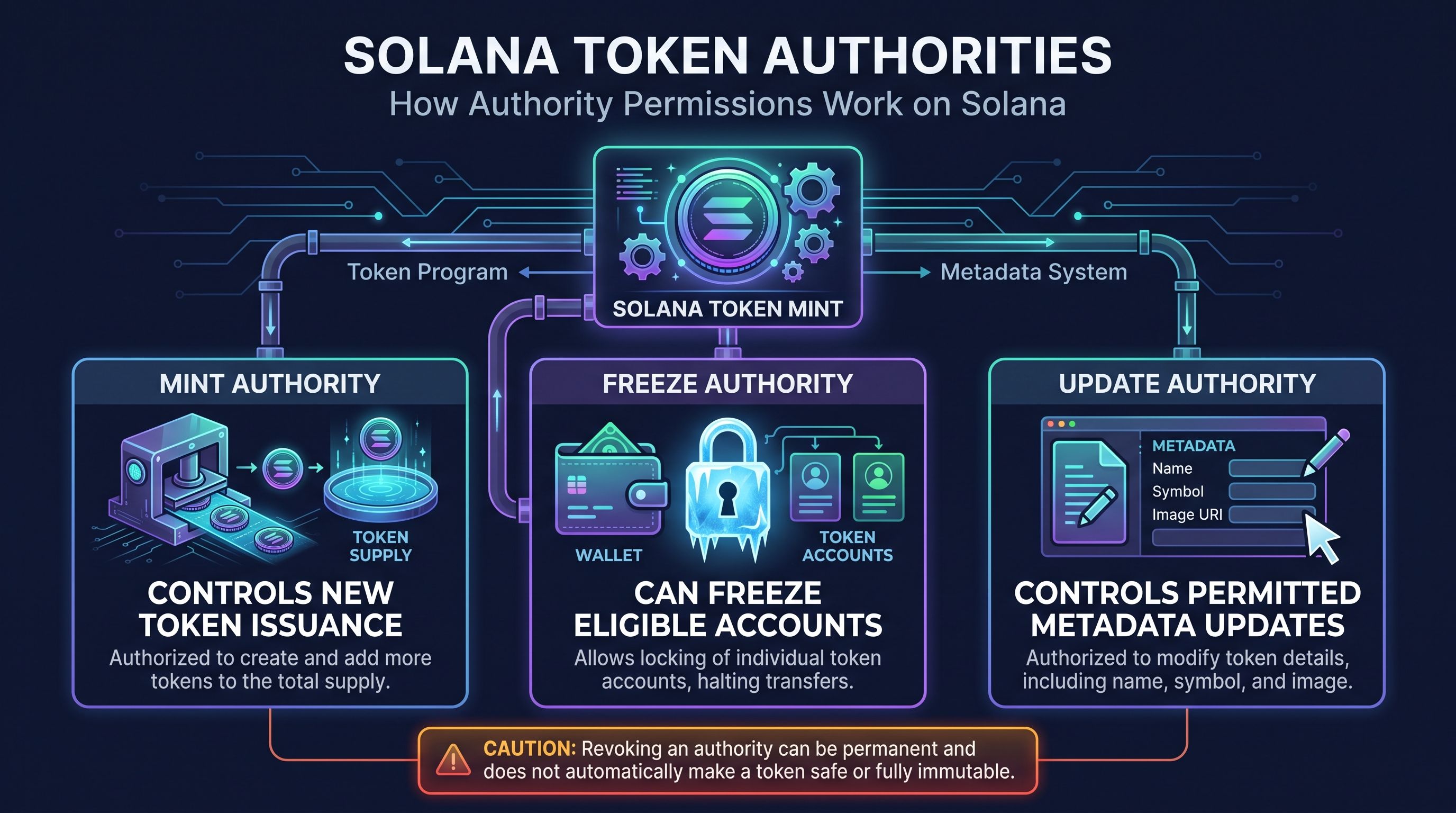
Confusing metadata Update Authority with Mint Authority: One controls supported metadata updates; the other authorizes token issuance.
Assuming metadata is always editable: Update permissions depend on the standard and the token’s current configuration.
Assuming immutability proves legitimacy: Immutable metadata can still describe a misleading or untrustworthy project. Verify the mint and evaluate the project separately.
How Solsmint Helps With Token Creation
Solsmint provides a no-code workflow for creating Solana SPL tokens. Depending on the current creation interface, users can configure supported token information such as name, symbol, supply, decimals, logo or metadata, and authority settings.
The available settings can change, so review the live interface before starting. Solsmint’s creation page is available at Solsmint’s token creation workflow.
This article explains how Solana metadata works generally. It does not imply that Solsmint can edit metadata after launch, change metadata authorities, or perform any other post-launch operation unless that capability is available in the current product interface.
Frequently Asked Questions
What is Solana token metadata?
Solana token metadata is descriptive information associated with a token, such as its name, symbol, image, or description. The storage method depends on the token program and metadata standard.
Where are an SPL token’s name and symbol stored?
It depends on the metadata setup. Metaplex Token Metadata stores them in a separate metadata account associated with the mint; Token-2022’s Token Metadata extension can store them on the mint. Solana’s Metaplex metadata documentation Solana’s Token-2022 metadata-extension documentation
How do I add a logo to a Solana token?
Usually, the metadata record points to a JSON document that includes an image URL. The exact setup depends on the token’s metadata standard and creation tool. Test both the JSON URI and image URL, then check how relevant wallets and explorers display them.
Can I change a Solana token’s name after launch?
Sometimes. It depends on the metadata standard, whether the metadata is mutable, and whether you control the required update authority. Confirm the token’s implementation before assuming an update is possible.
What is a token metadata URI?
A metadata URI is an address that points to metadata, often a JSON document with fields such as a description and image URL. Some Token-2022 configurations can store metadata fields directly on the mint as well.
What is the difference between token decimals and supply?
Decimals define how token amounts are divided into fractional units. Supply is the number of units minted. Both are core token properties, but they describe different things.
Does changing metadata change the token’s mint address?
No. A metadata update does not change the mint address, which uniquely identifies the token. It may change what supporting applications display.
What is the difference between Metaplex and Token-2022 metadata?
Metaplex commonly uses a separate metadata account linked to the mint. Token-2022 can store metadata on the mint with its Token Metadata extension, while its Metadata Pointer extension identifies an account containing metadata. Compatibility depends on the client and implementation.
Conclusion
Solana token metadata helps wallets and applications describe an asset, but it is distinct from the mint account’s core state. Names, symbols, descriptions, and logos are descriptive information; decimals and minted supply are token properties; and update authority determines who may change supported metadata.
Before launching, choose a metadata approach that fits your compatibility needs, prepare and test the JSON and image resources where required, and understand who controls the update authority. To review Solsmint’s current no-code creation options, visit Solsmint’s token creation workflow.
About Solsmint
Crypto enthusiast and blockchain analyst with expertise in the Solana ecosystem. Passionate about educating others on the potential of decentralized technologies and DeFi innovations.